Print anything, whatever your printer size.
Move your printer's box over the part and click. Oryx CAD cuts it and adds the clips that hold the pieces together.
- Printer boxSet your printer's size once. The box follows the mouse and cuts where it sits, as many times as needed.
- Cut planeDrag a plane across the part for a clean cut exactly where you want it.
- Removable or permanentHook clips to take it apart again, or hooks and alignment pins for a part that stays assembled.
- Lay flat to printOne click puts every piece flat on the bed, ready for the slicer.
A gear in about 3 clicks.
Choose the teeth and the thickness. Oryx Fit adds the partner gear, already meshed, and Oryx CAD tells you if it prints without supports.
- Spur, helical, herringboneThree tooth types, helix angle from 0 to 45°.
- Matching gearPick its number of teeth. Module and spacing follow.
- Gap in millimetresThins the teeth so printed gears turn freely. Outside size stays the same.
- Printability checkFlank angle shown live, with a clear supports or no supports verdict.
The part that fits, made for you.
Select a hole. Oryx Fit creates the screw or shaft that goes in it, with the clearance your printer needs.
- Oryx FitHole in, matching screw or shaft out. Optional clearance for parts that turn.
- Screws and nutsISO threads, real printed nut or a pocket for a store-bought one.
- SpringsCompression springs and flat zigzag springs.
- Snap clipsClips that click two printed parts together.
- Shift+A ▸ Oryx CADEvery part in Blender's own Add menu, snapping onto faces.
Draw it on the face. Push or pull.
Sketch a circle or a rectangle right on the part, type the size, then push to cut a pocket or pull to add material.
- Carve / AddSnaps to the face, live dimensions, exact values with Tab.
- Shape drillingExact holes and screw holes through any part.
- Stretch to sizeResize a part to an exact dimension.
- Align and snapLine parts up, press faces together, snap onto edges.
A finish you can feel, in 4 to 5 clicks.
Choose where, choose the pattern, set the depth. Oryx CAD shows it in print layers so the relief really comes out.
- Textures11 patterns or your own image, on the whole part, painted with a brush, or between two edges.
- Optimize meshRemoves useless faces without changing the shape. Lighter files, faster slicing.
- Clean mergeFuses several parts into one solid.
Texture tools in beta · Blender 5.0+
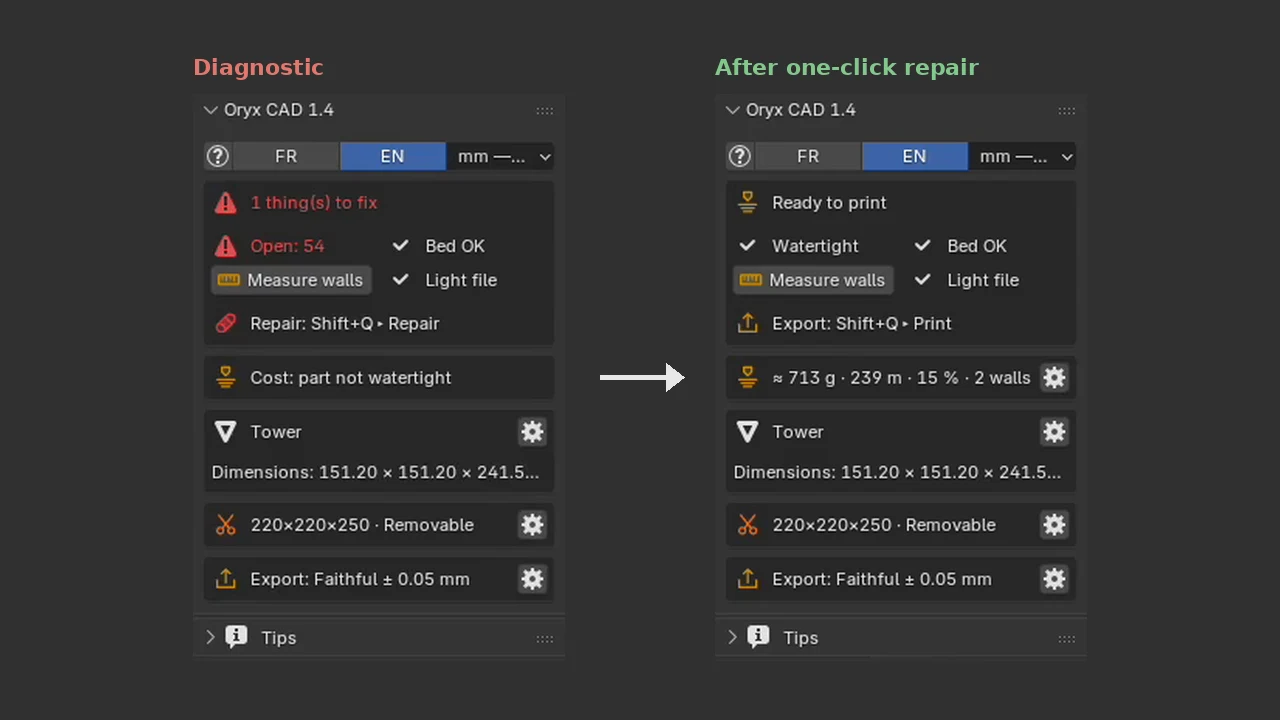 1.4 preview · real N-panel, before and after
Fixed before it reaches the slicer.
Diagnostic finds holes and broken faces. SmartRepair closes them. Export at the right scale, every time.
- Diagnostic and SmartRepairFinds and fixes what would fail in the slicer.
- MeasurementsEdge lengths, distances between faces and pinned rulers.
- ExportSTL, OBJ and 3MF at 1 unit = 1 mm, selection only if you want.
All of this in 1.4, for $14.99.
Buy 1.3 today, 1.4 is included when it ships. Runs in Blender, which is free.