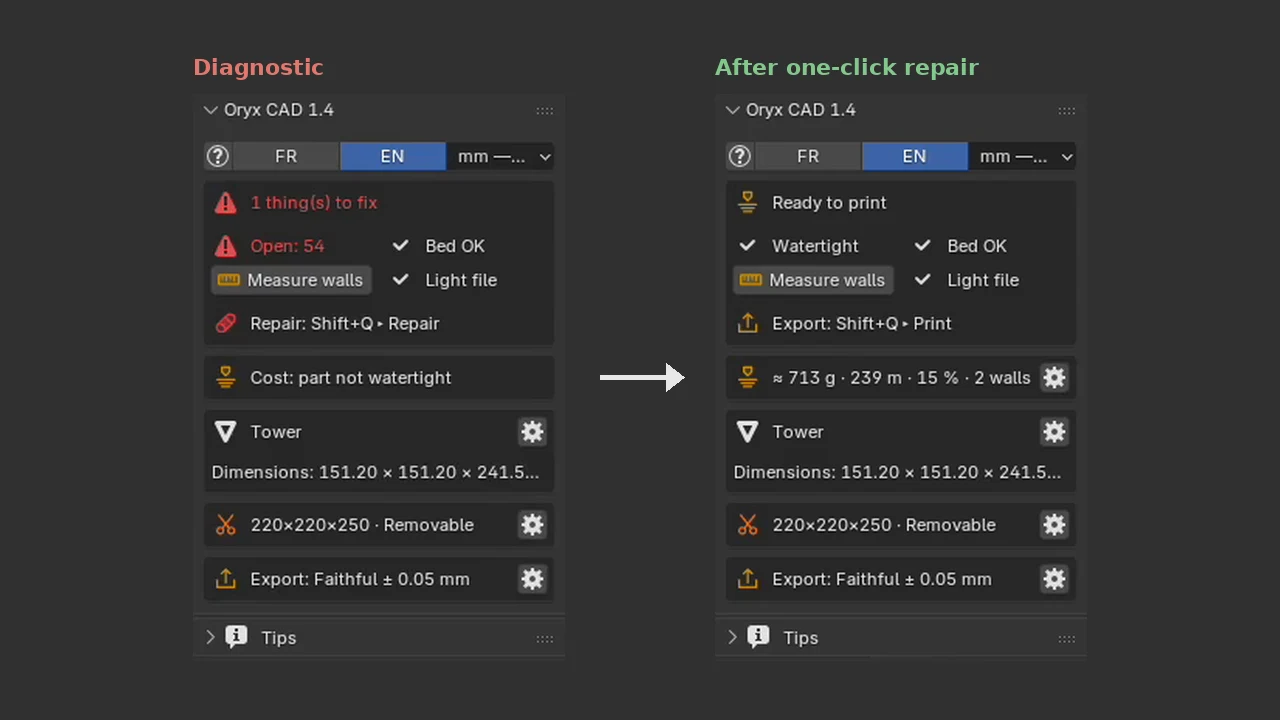
 1.4 preview · real N-panel, before and after
Fixed before it
reaches the slicer.
The diagnostic finds holes, open edges and broken faces as soon as you select a part. One click repairs them, and the export always comes out at the right scale.
Available today in Oryx CAD 1.3: diagnostic, topology cleanup and export at the right scale. New in 1.4, shown here: the "Will it print?" panel with filament estimate, and repair from the Oryx wheel. Included free.
In Blender, step by step.
Select the part
The Oryx panel shows what needs fixing: open edges, size against your printer, file weight.
Repair
Shift+Q › Repair › Repair for printing. Close vertices are welded, holes closed, normals fixed.
Check again
Watertight, bed OK, light file: the panel says Ready to print, with an estimate of weight and filament.
Export
STL, OBJ or 3MF at 1 unit = 1 mm, the selection only if you want.
The tools.
- DiagnosticWatertight, fits the bed, file weight at a glance, wall thickness on demand.
- SmartRepairWelds close vertices, removes broken faces, closes holes, recomputes normals.
- Print costEstimated weight and filament length once the part is watertight.
- MeasurementsEdge lengths, distances between faces and pinned rulers.
- ExportSTL, OBJ and 3MF at 1 unit = 1 mm.
Why check in Blender before the slicer?
A slicer can patch a broken mesh, but it guesses, and you only see the result once the print fails. Fixing in Blender shows you the problem on the model and keeps the repair in your file.
Oryx CAD also catches the classic scale mistake: Blender's default unit is the metre, a slicer reads millimetres. The export is always 1 unit = 1 mm.
Good to know.
What is a non-manifold mesh?
A mesh with holes, open edges or faces that do not close into a solid. Slicers cannot tell inside from outside and the print fails or comes out wrong.
Does the repair change my model's shape?
No. It welds, closes and cleans. The shape stays the same.
Which formats can I export?
STL, OBJ and 3MF, at 1 unit = 1 mm.
Which Blender versions are supported?
Blender 4.2 LTS to 5.2 LTS. Blender is free and open source. Texture tools need Blender 5.0 or later.
Every tool, for $14.99.
One-time purchase, nothing locked, no subscription. Runs in Blender, which is free.